In 2017, I was working for a company that was building an aggregation platform
for hotel bookings. For some weird reason, for all the email we sent,
recipients that used Office365 always had our emails going to their spam
folder. This was a problem because our emails were kind of important with all
the booking information.
This was kind of a head scratcher 😕, because were were using an office 365
SMTP server to send these emails, so it was weird that they were being marked
as spam. Also, gmail and other email providers were not marking our emails as
spam.
After some investigation, I didn’t find anything weird about our email content
or how we were using the library which was used to send emails. This was an
Elixir app, and we were using the https://github.com/fewlinesco/bamboo_smtp
library.
The first thing I tried was to send an email to my personal email address and
download the full message to see if there was anything weird going on. I didn’t
find anything strange.
Then, I figured, I could use another library to send out emails. I knew ruby,
so I used https://github.com/benprew/pony to send out a test email from the
same SMTP server. And, NOW the emails were not marked as spam. Bingo, I knew
then, that there was something wrong with our elixir library. I dumped out a
few emails from both the ruby and elixir libraries and compared them side by
side using a diff tool. The only difference between the emails was a multi part
delimiter. And, I also found that the elixir library had a hard-coded
delimiter. And, for some reason this was causing the emails to be marked as
spam by office365. (Office 365 was probably using this as a signal to mark the
email as spam).
I have been toying around with React to refresh my frontend skills (The last
time I used full stack seriously was with backbone.js 😂). While building this
app, I wanted to use cookies to store a JWT token from the backend. I did not
want the jwt token to be stored in local storage because of the security implications.
rg.POST("/login", func(c *gin.Context) { // NOTE: You would want to check username/password here c.SetCookie("_auth", "awesome.jwt.token", 3600, "", "", false, true)
c.JSON(http.StatusOK, gin.H{"message": "Logged in via cookie"}) })
rg.GET("/me", func(c *gin.Context) { jwt, err := c.Cookie("_auth") if err != nil { c.JSON(http.StatusUnauthorized, gin.H{"error": "Cookie not found"}) return }
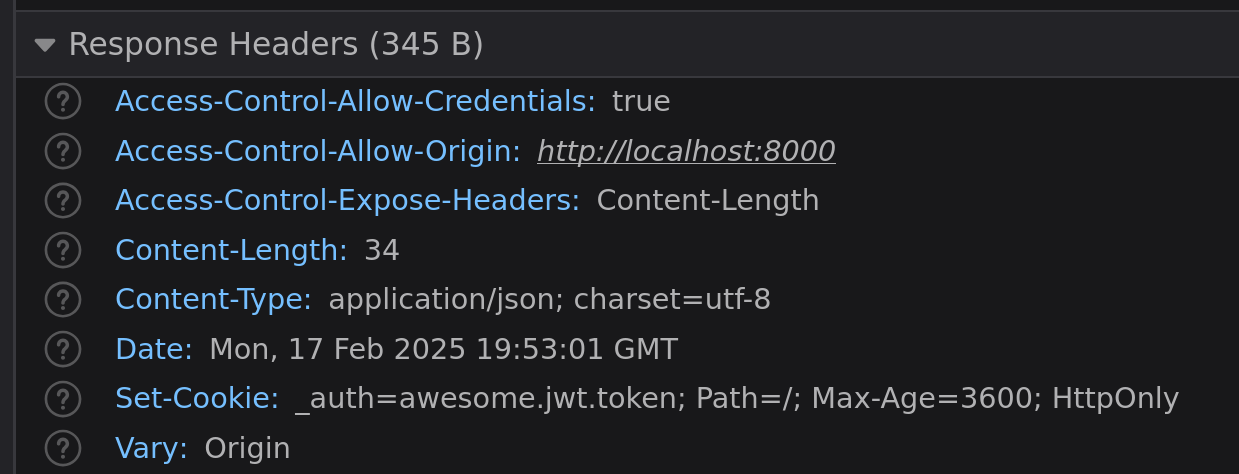
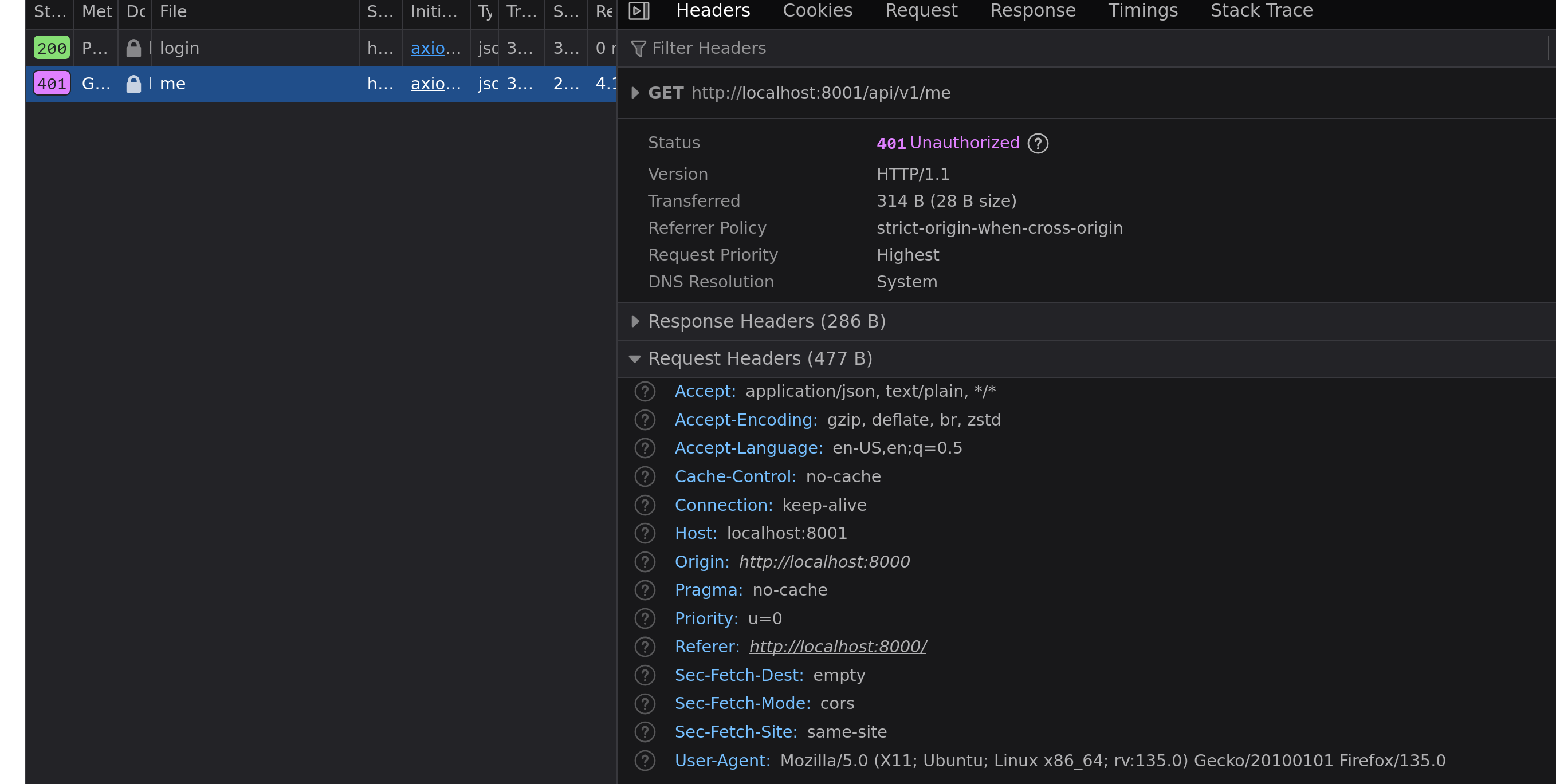
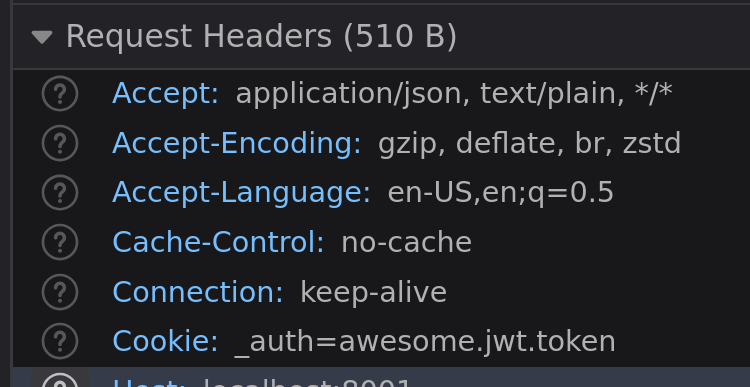
And, looking at the network tab in the browser, I see that the cookie is being set, but it is not being sent with the subsequent requests.
The fix
The problem is that we are not using the withCredentials option in axios, this is required for cookies to be sent with the request. Let’s fix the code:
This still didn’t fix the problem for me and I was pulling my hair when I finally figured that the withCredentials option needs to be set even for the code that does the authentication. Let’s fix that:
Most web apps have a few small tables which don’t change a lot but are read a
lot from, tables like settings or plans or products (some apps have less than 1000
products). You can do a quick size check of your tables by running the following
query:
1 2 3 4 5 6 7 8 9 10
-- https://stackoverflow.com/a/21738732/24105 SELECT pg_catalog.pg_namespace.nspname AS schema_name, relname, pg_size_pretty(pg_relation_size(pg_catalog.pg_class.oid)) AS tablesize FROM pg_catalog.pg_class INNERJOIN pg_catalog.pg_namespace ON relnamespace = pg_catalog.pg_namespace.oid WHERE pg_catalog.pg_namespace.nspname ='public'AND pg_catalog.pg_class.reltype <>0AND relname NOTLIKE'%_id_seq' ORDERBY3DESC;
At this point you need to decide how much memory in your app you can allocate
for these lookup tables. In my experience for a moderately sized app you could
go as high as 100MB tables. Make sure you add some metrics and benchmark
this before and after doing any optimiztions.
Say you have 4 tables which are small enough to fit in memory, and which you
read a lot from, the first thought that comes to mind is to use caching, and
when someone says caching you reach for redis or memcache or some other network
service. I would ask you to stop and think at this point, How would you cache
in a way that is faster than redis or memcache?
When using your app’s memory you don’t have to pay the network cost plus the
serialization/deserialization tax. Everytime you cache something in redis or
memcached, your app has to make a network call to these services and push out a
serialized version of the data while saving it and do the opposite while reading
it. This cost adds up if you do it on every page load.
I work with an app which keeps a website maintenance flag in memcache and this
ends up adding 30ms to every request that hits our servers. There is a better
way! Move your settings to your app’s memory. This can easily be done by
defining something like below(in ruby):
However, as they say one of the two hard problems in computer science is cache
invalidation. What do you do when your data changes? This is the hard part.
Just restart it!
The easiest strategy for this is to restart the server. This might be a
perfectly valid strategy. We do restart our apps when config values change, so
restarting for lookup tables with low frequency changes is a fair strategy.
Poll for changes
If that doesn’t work for your app because your lookup data changes frequently,
let us say every 5 minutes, another strategy is to poll for this data. The
idea is simple:
You load your data into a global variable.
You poll for changes in a separate thread using something like
suckerpunch
in ruby and
APScheduler
in python.
Content hash of your table
Fortunately there is an easy way to see if there is any change on a table in
postgres, aggregate the whole table into a single text column and then compute
the md5sum of it. This should change any time there is a change to the data.
1 2 3 4 5
SELECT /* to avoid random sorting */ MD5(CAST((ARRAY_AGG(t.*ORDERBY t)) AS text)) content_hash FROM settings t;
If all your changes go through the app through some kind of admin webpage, you
could also add pub/sub to broadcast an update whenever data is modified to which
all your app servers listen to and refresh the data.
Since elixir and erlang are all about concurrency, they lend themselves nicely
to this idiom. Let us see how this can be done in Elixir.
Manual cache invalidation
You could also build a button on your admin console which just pings a specific
endpoint e.g. /admin/:table/cache-invalidate and allow for manual cache
invalidation. The handler for this would just reload the global data.
I feel like the polling strategy is the most robust with the least number of
moving pieces. Please try this out in your app and let me know how this impacts
your performance.
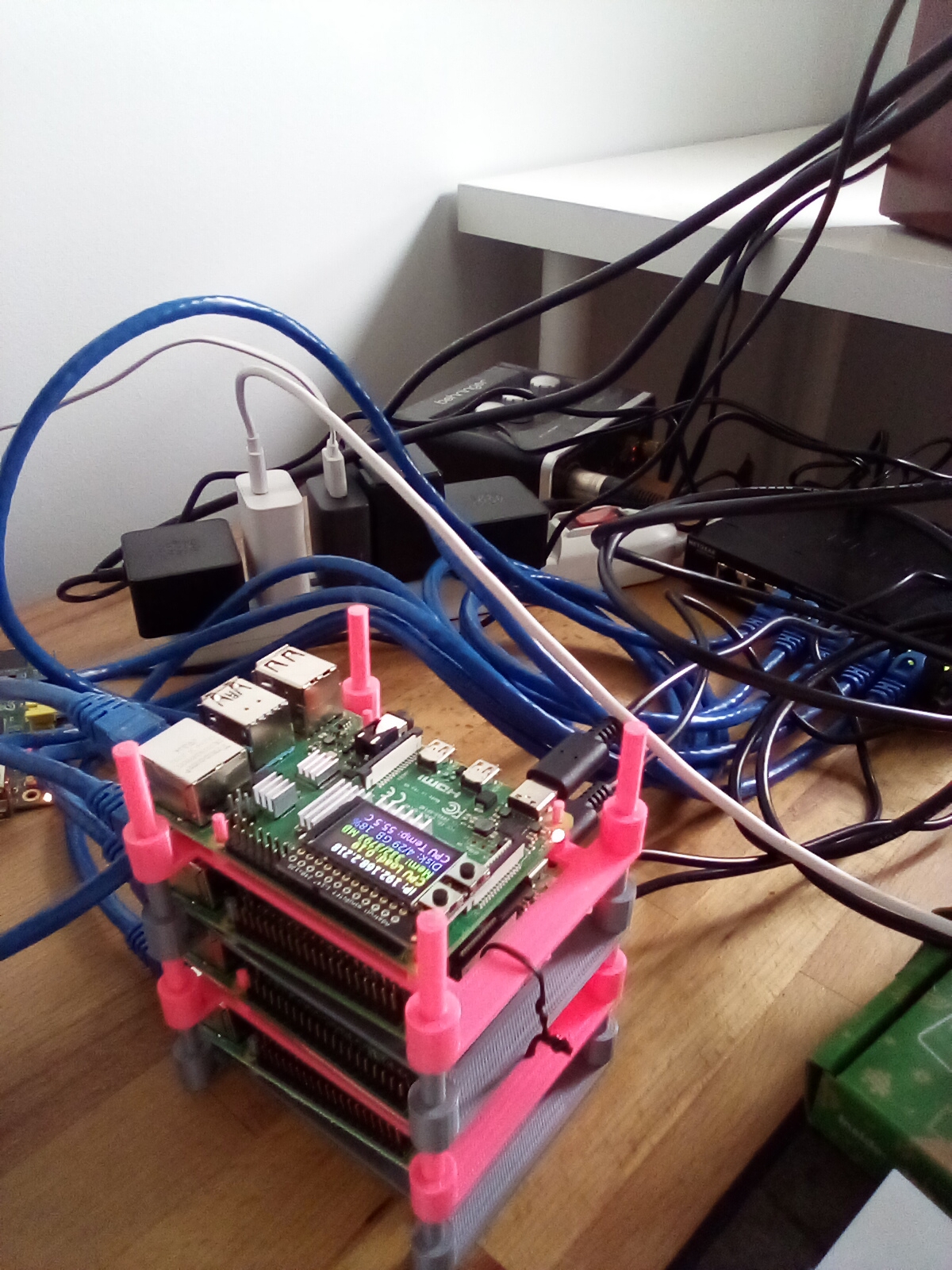
I have been dipping my feet into Distributed Systems and set up a cluster of Raspberry Pi Nodes recently.
The first thing I wanted to try was forming an Erlang cluster, And libcluster
makes this very easy through the Gossip strategy. Here is the code to form the
erlang cluster automatically (as long as it is on the same network).
# config/config.exs config :herd, topologies: [ # topologies can contain multiple strategies, However, we just have one # The name `:gossip` is not important gossip: [ # The selected clustering strategy. Required. strategy: Cluster.Strategy.Gossip, # Configuration for the provided strategy. Optional. config: [ port:45892, if_addr:"0.0.0.0", multicast_if:"192.168.1.1", multicast_addr:"230.1.1.251", multicast_ttl:1, secret:"somepassword" ], # The function to use for connecting nodes. The node # name will be appended to the argument list. Optional connect: {:net_kernel, :connect_node, []}, # The function to use for disconnecting nodes. The node # name will be appended to the argument list. Optional disconnect: {:erlang, :disconnect_node, []}, # The function to use for listing nodes. # This function must return a list of node names. Optional list_nodes: {:erlang, :nodes, [:connected]} ] ]
Once, the clustering was set up I wanted to try sending messages through the
cluster and see how it performed, the simplest test I could think of was a baton
relay. Essentially, I spin up one GenServer per node and it relays a counter to
the next node, which sends it to the next node and so on like the picture below
(psa, psb, psc, and psd are the names of the nodes):
The code for this ended up being very straightforward. We create a GenServer and
make one of the nodes a main_node so that it can kick off the baton relay.
And, whenever we get a counter with a :pass message we increment the counter
and forward it to the next node. Here is the full code:
defmoduleHerd.Baton.ErlangProcessdo use GenServer require Logger
@docfalse defstart_link(opts) do # Use {:global, ...} name's so that they can be addressed from other nodes name = global_proc_name(Node.self()) Logger.info("starting a baton process", name: inspect(name)) GenServer.start_link(__MODULE__, opts, name: name) end
# API to capture the shape of the function that sends a message to the next node defpass(node, rest_nodes, counter) do GenServer.cast(global_proc_name(node), {:pass, rest_nodes, counter}) end
@impltrue definit(state) do send(self(), :init) {:ok, state} end
@impltrue defhandle_info(:init, state) do if main_node?() do if cluster_formed?() do # Kick off the baton relay if we are the main node pass(Node.self(), [], 1) else # check again after 1 second Process.send_after(self(), :init, 1000) end end
{:noreply, state} end
# Our config has the name of the main node like so: # config :herd, # main_node: :herd@psa defpmain_node?() do Application.get_env(:herd, :main_node) == Node.self() end
defpcluster_formed?() do Node.list() != [] end
@impltrue defhandle_cast({:pass, nodes, counter}, state) do pass_the_baton(nodes, counter) {:noreply, state} end
defppass_the_baton([], counter), do: pass_the_baton(cluster_nodes(), counter) defppass_the_baton([next_node | rest_nodes], counter) do # Datadog guage to show us the change in counter Datadog.gauge("baton", counter, tags: host_tags()) pass(next_node, rest_nodes, counter + 1) end
defphost_tagsdo tags(host: to_string(Node.self())) end
deftags(kwlist) do kwlist |> Enum.map(fn {k, v} -> "#{k}:#{v}"end) end
defpglobal_proc_name(node) do {:global, {node, __MODULE__}} end
defpcluster_nodesdo [Node.self() | Node.list()] |> Enum.shuffle() end end
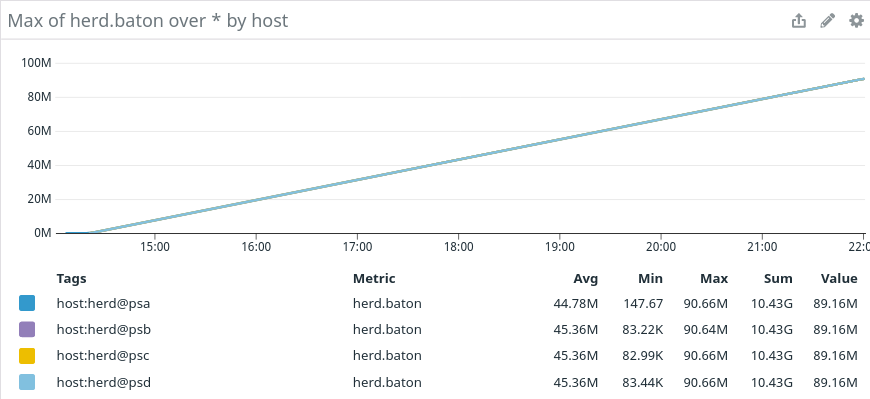
Finally, here is the Datadog graph for the counter, The big thing to note is
that the 4 GenServers on a local lan were able to pass around 100M messages in 8
hours which amounts to about 3.5K messages per second which is impressive:
So, I’ve set up a cluster of 4 Raspberry Pis to learn and experiment with
distributed systems.
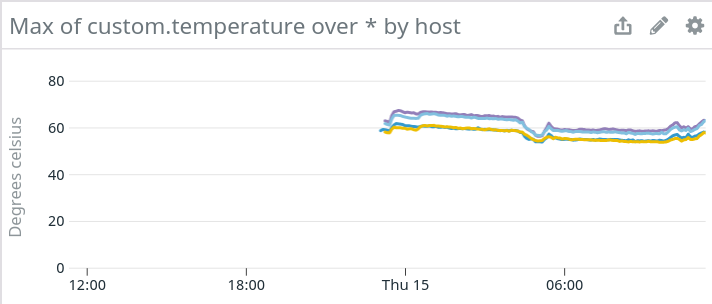
I also wanted to track various metrics while running the cluster, so I set up
Datadog APMs on all of them and since the pis usually run hot, I wanted to track
their temperatures for warning signs. Here is how you can send your temperature
info to Datadog.
Create 2 files, a temp.yaml and a temp.py (the names should match).
# the following try/except block will make the custom check compatible with any Agent version try: # first, try to import the base class from new versions of the Agent... from datadog_checks.base import AgentCheck except ImportError: # ...if the above failed, the check is running in Agent version < 6.6.0 from checks import AgentCheck
# content of the special variable __version__ will be shown in the Agent status page __version__ = "1.0.0"
The meat of this code is the following, where we send a guage metric named
custom.temperature and send it the temperature by reading
/sys/class/thermal/thermal_zone0/temp (this is how you can read the
temperature for a pi with ubuntu installed, you may have to tweak this bit for
other distros)
That’s it, you can tack other metrics in their too if you’d like to. You’ll also
need to restart your datadog agent for it to start sending these metrics.
I am in the process of migrating the data from one of my side projects to a
rewritten schema. While doing this, I wanted to keep the old table around with a
different name and do migrations at run time, only when I see someone is using
it. So, I started looking into how I can rename my table while doing a
pg_restore, turns out there is no way to do it. The following is a hacky way to
get it working.
Do a pg_dump of your db: pg_dump -Fc --no-acl --no-owner --table forms my_forms_prod > my_forms_prod.pgdump
Do a pg_restore into a temporary scratch database pg_restore --verbose --clean --no-acl --no-owner -d scratch my_forms_prod.dump
Rename your table: ALTER TABLE forms RENAME TO old_forms;
Do another dump: pg_dump -Fc --no-acl --no-owner scratch > my_old_forms_prod.pgdump which will have the “RENAMED” table :D
Now, you can import this using pg_restore: pg_restore --verbose --clean --no-acl --no-owner -d my_new_forms_prod my_old_forms_prod.dump
This is just a hack though. Hope you find it useful 😀
I am moving my app from Rails to Phoenix and as part of this I have to move my
database from being managed by Rails migrations to Phoenix migrations. Here is
how I did it:
Rename the schema_migrations table. Phoenix uses Ecto for managing the
database. Ecto and Rails use a table called schema_migrations to store the
database migration info. So, you’ll have to rename it to avoid errors when
you run Ecto migrations.
1 2
psql db ALTER TABLE schema_migrations RENAME TO rails_schema_migrations
After this, you’ll need to create the schema_migrations table for ecto, you
can do it by running the mix ecto.create command. This will set up the
schema_migrations table in the existing database.
Now, you’ve successfully migrated your database. And, you can run your
Phoenix/Ecto migrations like you would in a normal phoenix app.
I have an ECS cluster for my side projects and need to pass secrets to the app.
There are a few ways of doing it, and I think I found a nice balance between
simplicity and ease of use.
Wrong ways of sharing secrets
There are a few wrong ways of sharing secrets, Make sure you don’t do any of
these 🙂
Secrets in source code: This is a big no-no, you don’t want to store
secrets in your code because anyone with access to your code will be able to
read them.
Secrets built into the docker image: This is another bad idea, because
anyone with access to your images will have your secrets, moreover, if you
want to change a secret, you’ll have to build a new image and deploy it.
Secrets in the terraform ECS task definitions Environment block: This is
not very bad, but anyone with access to your terraform repo will be able to
read your secrets.
Store Secrets in the parameter store, one parameter per secret
The parameter store is a free and easy tool to save your secrets. There are
more fancy options like the secret manager, but they cost money.
One way of storing secrets is to create one parameter per environment variable,
e.g. if you have an app called money, you could create parameters called
money_database_url, money_secret_access_token etc,. Make sure you create
them as ‘SecretString’ types. And then in your task definition. Use the
following code:
This will make your secrets available to your ECS container via environment
variables called DATABASE_URL and SECRET_ACCESS_TOKEN. However, if you have
lots of secrets, this becomes unweildy.
Store Secrets in the parameter store, one parameter per app
I create a file called secrets.json with all the secrets (You can tweak this
step, and use some other format)
Once I have all the secrets listed in this file. I pass it through the following
command:
1
jq -c . < "secrets.json" | base64 --wrap 0
This strips the spaces in the json and base64 encodes it. I plug this value into
a single parameter called money_config and then use the same strategy as
before to pass it as an env var:
So, you have a ton of records to update in a really large table. Say, you need
to update 3 million records in a table with 100 million rows. And, let’s also
assume that you have a way of finding these records. Even, with all of this
info, updating 3M records in a single transaction is troublesome if your table
is being used moderately during this data fix. You have a high probability of
running into a deadlock or your query timing out.
There is a way you can do this by updating your data in small batches. The idea
is to first find the ids of the records you want to update and then updating a
small batch of them in each transaction.
For our example, let us say we have a users table which has 3M records created
in the year 2019 whose authentication token needs to be reset. Simple enough!
1. Doing this in a single update
Doing this in a single update is the easiest and is possible if you don’t use
this table a lot. However, as I said, it is prone to deadlocks and statement
timeouts.
1 2 3
UPDATE users SET authentication_token = encode(gen_random_bytes(32), 'base64') WHERE created_at BETWEEN'2019-01-01'AND'2019-12-31'
2. Doing this in multiple batches through a CTE
Doing this through a CTE in multiple batches works, but is not the most
efficient.
1 2 3 4 5 6 7 8 9 10 11 12 13 14
-- first get all the records that you want to update by using rolling OFFSETs -- and limiting to a nice batch size using LIMIT WITH users_to_be_updated ( SELECT id FROM users WHERE created_at BETWEEN'2019-01-01'AND'2019-12-31' LIMIT 1000 OFFSET0 ORDERBY id ) UPDATE users u SET authentication_token = encode(gen_random_bytes(32), 'base64') FROM users_to_be_updated utbu WHERE utbu.id = u.id
That works. However, it is not the most efficient update. Because, for every
batch, (in this example a batch of 1000) we perform the filtering and ordering
of all the data. So, we end up making the same query 3M/1K or 3000 times. Not
the most efficient use of our database resources!
3.1. Doing this in multiple batches using a temporary table
So, to remove the inefficiency from the previous step, we can create a temporary table to
store the filtered user ids while we update the records. Also, since this is a
temp table, it is discarded automatically once the session finishes.
1 2 3 4 5 6 7 8 9 10 11 12
CREATE TEMP TABLE users_to_be_updated AS SELECTROW_NUMBER() OVER(ORDERBY id) row_id, id FROM users WHERE created_at BETWEEN'2019-01-01'AND'2019-12-31'; CREATE INDEX ON users_to_be_updated(row_id);
UPDATE users u SET authentication_token = encode(gen_random_bytes(32), 'base64') FROM users_to_be_updated utbu WHERE utbu.id = u.id AND utbu.row_id >0AND utbu.row_id <=1000
So, in the above SQL we are creating a temporary table containing a row_id which
is a serial number going from 1 to the total number of rows and also adding an
index on this because we’ll be using it in our batch update WHERE clause. And,
finally doing our batch update by selecting the rows from 0..1000 in the first
iteration, 1000..2000 in the second iteration, and so on.
3.2. Tying this up via a ruby script to do the full update.
puts <<~SQL -- create our temporary table to avoid running this query for every batch update CREATE TEMP TABLE users_to_be_updated AS SELECT ROW_NUMBER() OVER(ORDER BY id) row_id, id FROM users WHERE created_at BETWEEN '2019-01-01' AND '2019-12-31'; -- create an index on row_id because we'll filter rows by this CREATE INDEX ON users_to_be_updated(row_id); SQL
(0..iterations).each do|i| start_id = i * batch_size end_id = (i + 1) * batch_size puts <<~SQL -- the row below prints out the current iteration which shows us the progress -- batch: #{i}/#{iterations} -- start a transaction for this batch update BEGIN; -- perform the actual batch update UPDATE users u SET authentication_token = encode(gen_random_bytes(32), 'base64') FROM users_to_be_updated utbu WHERE utbu.id = u.id AND utbu.row_id > #{start_id} AND utbu.row_id <= #{end_id}; -- commit this transaction so that we don't have a single long running transaction COMMIT; -- This is optional, sleep for 1 second to stop the database from being overwhelmed. -- You can tweak this to your desire time based on the resources you have or -- remove it. SELECT pg_sleep(1); SQL
end
This tiny script generates a sql file which can then be executed via psql to do
the whole process in one fell swoop.
1 2
# generate the sql file ruby sql_generator.rb > user_batch_update.sql
Once we have the sql file we run it through psql like so
context_ids.each do|context_id| product = Product.find_by(context_id: context_id) return product if product end end
This code tries to find the first product in the current contexts in the order
they are defined. However, the above code has a tiny bug. Can you figure out
what it is?
In cases where there are no products in any of the contexts this function
returns the array [1, 2, 3] instead of returning nil because Array.each
returns the array and in the case where we don’t find the product we don’t
return early.
We can easily fix this by adding an extra return at the end of the function.
context_ids .map { |context_id| Product.find_by(context_id: context_id)} .find{|x| x } end
This looks much cleaner! And it doesn’t have the previous bug either. However,
this code is not efficient, we want to return the first product we find for all
the contexts, and the above code always looks in all contexts even if it finds a
product for the first context. We need to be lazy!
Lazy enumerator for the win!
Calling .lazy on an enumerable gives you a lazy enumerator and the neat thing
about that is it only executes the chain of functions as many times as needed.
Here is a short example which demonstrates its use:
# The above `.map` gets executed for every element in the range every time!
# using the lazy enumerator (1..3).lazy.map{|id| find(id)}.find{|x| x} # > finding 1 # > finding 2 # => :product
As you can see from the above example, the lazy enumerator executes only as many
times as necessary. Here is another example from the ruby docs, to drive the
point home:
1 2 3
irb> (1..Float::INFINITY).lazy.select(&:odd?).drop(10).take(2).to_a # => [21, 23] # Without the lazy enumerator, this would crash your console!
Now applying this to our code is pretty straightforward, we just need to add a
call to #.lazy before we map and we are all set!
When you are writing functional code, it is sometimes difficult to figure out
which of the Enum functions you want to use. Here are a few common use cases.
Use Enum.map
You can use Enum.map when you want to transform a set of elements into
another set of elements. Also, note that the count of elements remains
unchanged. So, if you transform a list of 5 elements using Enum.map, you get
an output list containing exactly 5 elements, However, the shape of the elements
might be different.
Examples
1 2 3
# transform names into their lengths iex> Enum.map(["jack", "mujju", "danny boy"], fn x -> String.length(x) end) [4, 5, 9]
If you look at the count of input and output elements it remains the same,
However, the shape is different, the input elements are all strings whereas the
output elements are all numbers.
1 2 3
# get ids of all users from a list of structs iex> Enum.map([%{id:1, name:"Danny"}, %{id:2, name:"Mujju"}], fn x -> x.id end) [1, 2]
In this example we transform a list of maps to a list of numbers.
Use Enum.filter
When you want to whittle down your input list, use Enum.filter, Filtering
doesn’t change the shape of the data, i.e. you are not transforming elements,
and the shape of the input data will be the same as the shape of the output
data. However, the count of elements will be different, to be more precise it
will be lesser or the same as the input list count.
Examples
1 2 3
# filter a list to only get names which start with `m` iex> Enum.filter(["mujju", "danny", "min", "moe", "boe", "joe"], fn x -> String.starts_with?(x, "m") end) ["mujju", "min", "moe"]
The shape of data here is the same, we use a list of strings as the input and
get a list of strings as an output, only the count has changed, in this case, we
have fewer elements.
1 2 3
# filter a list of users to only get active users iex> Enum.filter([%{id:1, name:"Danny", active:true}, %{id:2, name:"Mujju", active:false}], fn x -> x.active end) [%{active:true, id:1, name:"Danny"}]
In this example too, the shape of the input elements is a map (user) and the
shape of output elements is still a map.
Use Enum.reduce
The last of the commonly used Enum functions is Enum.reduce and it is also
one of the most powerful functions. You can use Enum.reduce when you need to
change the shape of the input list into something else, for instance a map or a
number.
Examples
Change a list of elements into a number by computing its product or sum
Enum.reduce takes three arguments, the first is the input enumerable, which is
usually a list or map, the second is the starting value of the accumulator and
the third is a function which is applied for each element
whose result is then sent to the next function application as the accumulator.
Let’s try and understand this using an equivalent javascript example.
// starting value of accumulator, we want to chose this wisely, for instance // when we want addition, we should use a `0` as the start value to avoid // impacting the output and if you want to compute a product we use a `1`, this // is usually called the identity element for the function: https://en.wikipedia.org/wiki/Identity_element // It is also the value that is returned when the input list is empty let acc = 0
// loop over all the input elements and for each element compute the new // accumulator as the sum of the current accumulator and the current element for(const x of inputList) { // compute the next value of our accumulator, in our Elixir code this is // done by the third argument which is a function which gets `x` and `acc` acc = acc + x }
// in Elixir, the final value of the accumulator is returned
Let’s look at another example of converting an employee list into a map
containing an employee id and their name.
At my work, we use ruby heavily and sidekiq is an essential part of our stack.
Sometimes, I long for the concurrency primitives from Elixir, but that’s not
what today’s post is about.
A few days ago, I caused a minor incident by overloading our databases. Having
been away from ruby for a bit, I had forgotten that sidekiq runs multiple
threads per each worker instance. So, I ended up enqueuing about 10K jobs on
Sidekiq, and Sidekiq started executing them immediately. We have 50 worker
instances and run Sidekiq with a concurrency of 20. So, essentially we had 400
worker threads ready to start crunching these jobs. Coincidentally we have 400
database connections available and my batch background job ended up consuming
all the connections for 5 minutes during which the other parts of
the application were connection starved and started throwing errors 😬.
That was a dumb mistake. Whenever you find yourself making a dumb mistake,
make sure that no one else can repeat that mistake. To fix that, we could set up
our database with multiple users in such a way that the web app would connect
with a user which could only open a maximum of 100 connections, the background
worker with a user with its own limits and, so on. This would stop these kinds of
problems from happening again. However, we’ll get there when we get there, as
this would require infrastructure changes.
I had another batch job lined up which had to process millions of rows in a
similar fashion. And, I started looking for solutions. A few solutions that were
suggested were to run these jobs on a single worker or a small set of workers,
you can do this by having a custom queue for this job and executing a separate
sidekiq instance just for this one queue. However, that would require some
infrastructure work. So, I started looking at other options.
I thought that redis might have something to help us here, and it did! So, redis
allows you to make blocking pops from a list using the BLPOP function. So, if
you run BLPOP myjob 10, it will pop the first available element in the list,
However, if the list is empty, it will block for 10 seconds during which if an
element is inserted, it will pop it and return its value. Using this knowledge,
I thought we could control the enqueuing based on the elements in the list. The
idea is simple.
Before the background job starts, I would seed this list with n elements
where n is the desired concurrency. So, if I seed this list with 2
elements, Sidekiq would execute only 2 jobs at any point in time, regardless
of the number of worker instances/concurrency of sidekiq workers.
The way this is enforced is by the enqueue function using a BLPOP before it
enqueues, so, as soon as the enqueuer starts, it pops the first 2 elements from
the redis list and enqueues 2 jobs. At this point, the enqueuer is stuck till we
add more elements to the list.
That’s where the background jobs come into play, at the end of each
background job, we add one element back to the list using LPUSH and as soon
as an element is added the enqueuer which is blocked at BLPOP pops this
element and enqueues another job. This goes on till all your background jobs
are enqueued, all the while making sure that there are never more than 2 jobs
at any given time.
moduleControlledConcurrency # I love module_function module_function
# The name of our list needs to be constant per worker type, you could # probably extract this into a Sidekiq middleware with a little effort LIST_NAME = "migrate"
defsetup(concurrency:) # if our list already has elements before we start, our concurrency will be # screwed, so, this is a safety check! slot_count = Redis.current.llen(LIST_NAME) raise "Key '#{LIST_NAME}' is being used, it already has #{slot_count} slots"if slot_count > 0
# Seed our list with as many items as the concurrency, the contents of this # list don't matter. Redis.current.lpush(LIST_NAME, concurrency.times.to_a) end
# A helper function to bump up concurrency if you need to defincrease_concurrency(n = 1) Redis.current.lpush(LIST_NAME, n.times.to_a) end
# A helper function to bump the concurrency down if you need to defdecrease_concurrency(n = 1) n.times do puts "> waiting" Redis.current.blpop(LIST_NAME) puts "> decrease by 1" end end
# This is our core enqueuer, it runs in a loop because our blpop might get a # timeout and return nil, we keep trying till it returns a value defnq(&block) loop do puts "> waiting to enqueue" slot = Redis.current.blpop(LIST_NAME) if slot puts "> found slot #{slot}" yield return end end end
# Function which allow background workers to signal that a job has been # completed, so that the enqueuer can nq more jobs. defreturn_slot puts "> returning slot" Redis.current.lpush(LIST_NAME, 1) end
end
# This is our Sidekiq worker classHardWorker include Sidekiq::Worker
# Our set up doesn't enforce concurrency across retries, if you want this, # you'll probably have to tweak the code a little more :) sidekiq_options retry:false
# the only custom code here is in the ensure block defperform(user_id) puts "> start: #{user_id}" # mock work sleep 1 puts "> finish: #{user_id}" ensure # make sure that we return this slot at the end of the background job, so # that the next job can be enqueued. This doesn't handle retries because of # failures, we disabled retries for our job, but if you have them enabled, # you might end up having more jobs than the set concurrency because of # retried jobs. ControlledConcurrency.return_slot end end
# ./enqueuer.rb # Before running the enqueuer, we need to set up the concurrency using the above script # This our enqueuer and it makes sure that the block passed to # ControlledConcurrency.nq doesn't enqueue more jobs that our concurrency # setting. 100.times do|i| ControlledConcurrency.nq do puts "> enqueuing user_id: #{i}" HardWorker.perform_async(i) end end
Cowboy is an amazing web server that is used by Plug/Phoenix out of the box, I
don’t think Phoenix supports any other web servers at the moment. However, the
plug
adapter
is fairly abstracted, and plug implements this adapter for cowboy through the
plug_cowboy hex package. In
theory, you should be able to write a new adapter if you just implement the Plug
adapter behaviour.
The plug cowboy adapter has a lot of interesting code and you’ll learn a lot
from reading it. Anyway, this blog post isn’t about Plug or Phoenix. I wanted to
show off how you can create a simple Cowboy server without using Plug or Phoenix
(I had to learn how to do this while creating my side project
webpipe)
We want an application which spins up a cowboy server and renders a hello world
message. Here is the required code for that:
defmoduleHellodo # The handler module which handles all requests, its `init` function is called # by Cowboy for all matching requests. defmoduleHandlerdo definit(req, _opts) do resp = :cowboy_req.reply( _status = 200, _headers = %{"content-type" => "text/html; charset=utf-8"}, _body = "<!doctype html><h1>Hello, Cowboy!</h1>", _request = req )
{:ok, resp, []} end end
defstartdo # compile the routes routes = :cowboy_router.compile([ {:_, [ # { wildcard, handler module (needs to have an init function), options } {:_, Handler, []} ]} ])
require Logger Logger.info("Staring server at http://localhost:4001/")
# start an http server :cowboy.start_clear( :hello_http, [port:4001], %{env: %{dispatch: routes}} ) end end
And, here is a quick test to assert that it works!
1 2 3 4 5 6 7 8
defmoduleHelloTestdo use ExUnit.Case
test "returns hello world"do assert {:ok, {{'HTTP/1.1', 200, 'OK'}, _headers, '<!doctype html><h1>Hello, Cowboy!</h1>'}} = :httpc.request('http://localhost:4001/') end end
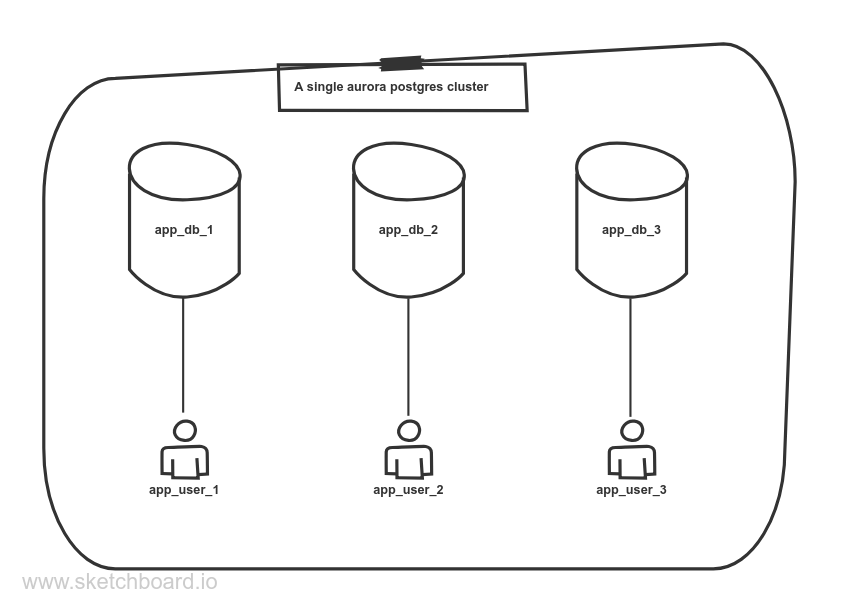
I have been playing around with terraform for the last few days and it is an
amazing tool to manage infrastructure. For my AWS infrastructure I needed an
aurora postgresql cluster which would allow hosting of multiple databases, each
for one of my side projects, while also keeping them isolated and preventing
an app user from accessing other app’s databases.
The first roadblock was that my RDS cluster wasn’t accessible publicly (which is
how it should be for security reasons). I do have a way to connect to my
postgres servers via a bastion
host.
I thought we could use an SSH tunnel over the bastion host to get to our RDS
cluster from my local computer. However, terraform doesn’t support
connecting to the postgres server over an SSH tunnel via its configuration.
So, it required a little bit of jerry-rigging. The postgresql provider was happy
as long as it could reach the postgres cluster using a host, port and password.
So, I set up a local tunnel outside terraform via my SSH config like so:
The relevant line here is the LocalForward declaration which wires up a local
port forward so that when you network traffic hits port 3333 on your
localhost it is tunneled over the bastion and then the ecs server and is
routed to your cluster’s port 5432. One thing to note here is that your ecs
cluster should be able to connect to your RDS cluster via proper security group
rules.
Setting up the postgres provider
Once you have the ssh tunnel set up, you can start wiring up your postgres
provider for terraform like so:
1
2
3
4
5
6
7
8
9
10
11
12
13
14
15
provider "postgresql" { version = "~> 1.5"
# LocalForwarded on the local computer via an SSH tunnel to # module.hn_db.this_rds_cluster_endpoint # via # LocalForward localhost:3333 module.hn_db.this_rds_cluster_endpoint:5432 host = "localhost" port = 3333 username = "root" superuser = false password = module.hn_db.this_rds_cluster_master_password sslmode = "require" connect_timeout = 15 }
The provider config is pretty straightforward, we point it to localhost:3333
with a root user (which is the master user created by the rds cluster). So,
when you connect to localhost:3333, you are actually connecting to the RDS
cluster through an SSH tunnel (make sure that your ssh connection is open at
this point via ssh ecs1-pg in a separate terminal). We also need to set the
superuser to false because RDS doesn’t give us a postgres superuser, getting
this wrong initially caused me a lot of frustration.
Setting up the database and it’s user
Now that our cluster connectivity is set up, we can start creating the databases
and users, each for one of our apps.
Below is a sensible configuration for a database called liveform_prod and it’s
user called liveform.
output "liveform_db_password" { description = "Liveform db password" value = random_password.liveform_db_password.result }
A few things to note here:
The database liveform_prod is owned by a new user called liveform.
It has a connection limit of 5, You should always set a sensible
connection limit to prevent this app from crashing the cluster.
The db user too has a connection limit of 5 and a statement timeout of 1
minute which is big enough for web apps, you should set it to the least
duration which works for your app.
A random password (via the random_password resource) is used as the
password of our new liveform role. This can be viewed by running
terraform show
Isolating this database from other users
By default postgres allows all users to connect to all databases and create/view
from all the tables. We want our databases to be isolated properly so that a
user for one app cannot access another app’s database. This requires running of
some SQL on the newly created database. We can easily do this using a
null_resource and a local-exec provisioner like so:
# This needs an SSH TUNNEL to be set up # password needs to be supplied via the PGPASSWORD env var psql --host "localhost" \ --port "3333" \ --username "$PG_DB_ROLE_NAME" \ --dbname "$PG_DB_NAME" \ --file - <<SQL REVOKE CONNECT ON DATABASE $PG_DB_NAME FROM PUBLIC; GRANT CONNECT ON DATABASE $PG_DB_NAME TO $PG_DB_ROLE_NAME; GRANT CONNECT ON DATABASE $PG_DB_NAME TO root; SQL
The pg_database_roles_setup.sh script connects to our rds cluster over the SSH
tunnel to the newly created database as the newly created user and revokes
connect privileges for all users on this database, and then adds connect
privileges to the app user and the root user. You can add more queries to this
script that you might want to run after the database is set up. Finally, the
local-exec provisioner passes the right data via environment variables and
calls the database setup script.
Gotchas
If you create a posgresql_role before setting the connection’s superuser to
false, you’ll get stuck trying to update or delete the new role. To work around
this, manually log in to the rds cluster via psql and DROP the role, and remove
this state from terraform using: terraform state rm
postgresql_role.liveform_db_role
I have recently started learning Terraform to manage my AWS resources, And it is
a great tool for maintaining your infrastructure! I use a Bastion
host to SSH into my main servers
and bring up the bastion host on demand only when I need it giving me some cost
savings. Here are the required Terraform files to get this working.
# get a reference to aws_ami.id using a data resource by finding the right AMI data "aws_ami" "ubuntu" { # pick the most recent version of the AMI most_recent = true
# Find the 20.04 image filter { name = "name" values = ["ubuntu/images/hvm-ssd/ubuntu-focal-20.04-amd64-server-*"] }
# With the right virtualization type filter { name = "virtualization-type" values = ["hvm"] }
# And the image should be published by Canonical (which is a trusted source) owners = ["099720109477"] # Canonical's owner_id don't change this }
# Configuration for your bastion EC2 instance resource "aws_instance" "bastion" { # Use the AMI from the above step ami = data.aws_ami.ubuntu.id
# We don't need a heavy duty server, t2.micro should suffice instance_type = "t2.micro"
# We use a variable which can be set to true or false in the terraform.tfvars # file to control creating or destroying the bastion resource on demand. count = var.bastion_enabled ? 1 : 0
# The ssh key name key_name = var.ssh_key_name
# This should refer to the subnet in which you want to spin up the Bastion host # You can even hardcode this ID by getting a subnet id from the AWS console subnet_id = aws_subnet.subnet[0].id
# The 2 security groups here have 2 important rules # 1. hn_bastion_sg: opens up Port 22 for just my IP address # 2. default: sets up an open network within the security group vpc_security_group_ids = [aws_security_group.hn_bastion_sg.id, aws_default_security_group.default.id]
# Since we want to access this via internet, we need a public IP associate_public_ip_address = true
# Some useful tags tags = { Name = "Bastion" } }
# We want to output the public_dns name of the bastion host when it spins up output "bastion-public-dns" { value = var.bastion_enabled ? aws_instance.bastion[0].public_dns : "No-bastion" }
Set up the terraform.tfvars file like so:
1 2 3 4 5 6 7 8 9 10 11
# Set this to `true` and do a `terraform apply` to spin up a bastion host # and when you are done, set it to `false` and do another `terraform apply` bastion_enabled = false
# My SSH keyname (without the .pem extension) ssh_key_name = "hyperngn_aws_ohio"
# The IP of my computer. Do a `curl -sq icanhazip.com` to get it # Look for the **ProTip** down below to automate this! myip = ["247.39.103.23/32"]
variable "myip" { type = list(string) description = "My IP to allow SSH access into the bastion server" }
variable "bastion_enabled" { description = "Spins up a bastion host if enabled" type = bool }
Relevant sections from my vpc.tf, you could just hardcode these values in the
bastion.tf or use data if you’ve set these up manually and resources if
you use terraform to control them
# Bastion config Host bastion # Change the hostname to whatever you get from terraform's output Hostname ec2-5-55-128-160.us-east-2.compute.amazonaws.com IdentityFile ~/.ssh/hyperngn_aws_ohio.pem
# This section is optional but allows you to reuse SSH connections Host * User ubuntu Compression yes # every 10 minutes send an alive ping ServerAliveInterval 60 ControlMaster auto ControlPath /tmp/ssh-%r@%h:%p
Once you are done, you can just login by running the following command and it
should run seamlessly:
1
ssh ecs1
Pro-Tip Put the following in your terraform folder’s .envrc, so that you
don’t have to manually copy paste your IP every time you bring your bastion host
up (You also need to have direnv for this to work).
If you run into any issues use the ssh -vv ecs1 command to get copious
logs and read through all of them to figure out what might be wrong.
Make sure you are using the correct User, Ubuntu AMIs create a user called
ubuntu whereas Amazon ECS optimized AMIs create an ec2-user user, If you
get the user wrong ssh will fail.
Use private IPs for the target servers that you are jumping into and the
public IP or public DNS for your bastion host.
Make sure your Bastion host is in the same VPC with a default security group
which allows inter security group communication and a security group which
opens up the SSH port for your IP. If they are not on the same VPC make sure
they have the right security groups to allow communication from the bastion
host to the target host, specifically on port 22. You can use VPC flow logs
to figure problems in your network.
From a security point of view this is a pretty great set up, your normal servers
don’t allow any SSH access (and in my case aren’t even public and are fronted by
ALBs). And your bastion host is not up all the time, and even when it is up, it
only allows traffic from your single IP. It also saves cost by tearing down the
bastion instance when you don’t need it.
The other day I was helping a friend set up a phoenix app which required the use
of tags on products, we all have used tags in our day to day to add information
about notes, images, and other stuff. Tags are just labels/chunks-of-text which
are used to associated with an entity like a product, blog post, image, etc.
This blog post has a few tags too (Ecto, Elixir, Phoenix, etc.). Tags help us
organize information by annotating records with useful fragments of
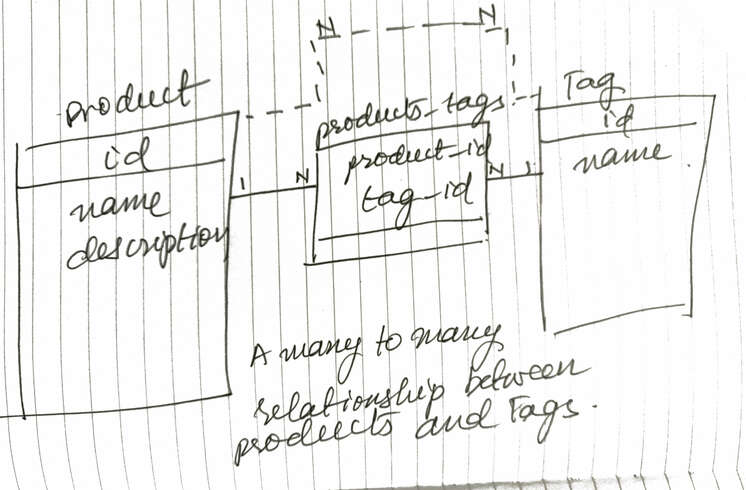
information. And modeling these in a database is pretty straightforward, it is
usually implemented like the following design.
As you can see, we have a many-to-many relation between the products and tags
tables via a products_tags table which has just 2 columns the product_id and
the tag_id and it has a composite primary key (while also having an index on
the tag_id to make lookups faster). The use of a join table is required,
however, you usually want the join table to be invisible in your domain, as you
don’t want to deal with a ProductTag model, it doesn’t serve any purpose other
than helping you bridge the object model with the relational model. Anyway, here
is how we ended up building the many-to-many relationship in Phoenix and Ecto.
Scaffolding the models
We use a nondescript Core context for our Product model by running the
following scaffold code:
This generates the following migration (I’ve omitted the boilerplate to make
reading the relevant code easier):
1 2 3 4 5 6
create table(:products) do add :name, :string add :description, :text
timestamps() end
Don’t forget to add the following to your router.ex
1
resources "/products", ProductController
Then, we add the Tag in the same context by running the following scaffold
generator:
1
mix phx.gen.html Core Tag tags name:string:unique
This generates the following migration, note the unique index on name, as we
don’t want tags with duplicate names, you might have separate tags per user in
which case you would have a unique index on [:user_id, :name].
1 2 3 4 5 6 7
create table(:tags) do add :name, :string
timestamps() end
create unique_index(:tags, [:name])
Finally, we generate the migration for the join table products_tags(by
convention it uses the pluralized names of both entities joined by an underscore
so products and tags joined by an _ gives us the name products_tags).
We added a primary_key: false declaration to the table() function call
to avoid creating a wasted id column.
We got rid of the timestamps() declaration as we don’t want to track
inserts and updates on the joins. You might want to track inserts if
you want to know when a product was tagged with a specific tag which makes
things a little more complex, so, we’ll avoid it for now.
We added a , primary_key: true to the :product_id and :tag_id lines
to make [:product_id, :tag_id] a composite primary key
Now our database is set up nicely for our many-to-many relationship. Here is how
our tables look in the database:
Now comes the fun part, modifying our controllers and contexts to get our tags
working!
The first thing we need to do is add a many_to_many relationship on the Product schema like so:
1 2 3 4 5 6 7
schema "products"do field :description, :string field :name, :string many_to_many :tags, ProductTagsDemo.Core.Tag, join_through:"products_tags"
timestamps() end
(Note, that we don’t need to add this relationship on the other side, i.e., Tag
to get this working)
Now, we need to modify our Product form to show an input mechanism for tags,
the easy way to do this is to ask the users to provide a comma-separated list of
tags in an input textbox. A nicer way is to use a javascript library like
select2.
For us, a text box with comma-separated tags will suffice.
The easiest way to do this is to add a text field like so:
However, as soon as you wire this up you’ll get an error on the /products/new
page like below:
1
protocol Phoenix.HTML.Safe not implemented for #Ecto.Association.NotLoaded<association :tags is not loaded> of type Ecto.Association.NotLoaded (a struct).
This is telling us that the to_string function can’t convert an
Ecto.Association.NotLoaded struct into a string, When you have a relation like
a belongs_to or has_one or many_to_many that isn’t loaded on a struct, it
has this default value. This is coming from our controller, we can remedy this
by changing our action to the following:
1 2 3 4
defnew(conn, _params) do changeset = Core.change_product(%Product{tags: []}) render(conn, "new.html", changeset: changeset) end
Notice the tags: [], we are creating a new product with an empty tags
collection so that it renders properly in the form.
Now that we have fixed our form, we can try submitting some tags through this
form, However, when you enter any tags and hit Save it doesn’t do anything
which is not surprising because we haven’t set up the handling of these tags on
the backend yet.
We know that the tags field has comma-separated tags, so we need to do the
following to be able to save a product.
Split tags on a comma.
Strip them of whitespace.
Lowercase them to get them to be homogeneous (If you want your tag names to
be persisted using the input casing and still treat the uppercased version
the same as the lowercased or capitalized versions, you can use :citext
(short for case insensitive text) read more about how to set up :citext
columns in my blog post about storing username/email in a case insensitive
fashion).
Once we have all the tag names we can insert any new tags and then fetch
the existing tags, combine them, and use put_assoc to put them on the
product.
Step #4 creates a race condition in your code which can happen when 2 requests
try to create tags with the same name at the same time. An easy way to work
around this is to treat all the tags as new and do an upsert using
Repo.insert_all with an on_conflict: :nothing option which adds the fragment
ON CONFLICT DO NOTHING to your SQL making your query run successfully even if
there are tags with the same name in the database, it just doesn’t insert new
tags. Also, note that this function inserts all the tags in a single query doing
a bulk insert of all the input tags. Once you upsert all the tags, you can
then find them and use a put_assoc to create an association.
This is what ended up as the final Core.create_product function:
defcreate_product(attrs \\ %{}) do %Product{} |> Product.changeset(attrs) # use put_assoc to associate the input tags to the product |> Ecto.Changeset.put_assoc(:tags, product_tags(attrs)) |> Repo.insert() end
defpparse_tags(nil), do: []
defpparse_tags(tags) do # Repo.insert_all requires the inserted_at and updated_at to be filled out # and they should have time truncated to the second that is why we need this now = NaiveDateTime.utc_now() |> NaiveDateTime.truncate(:second)
for tag <- String.split(tags, ","), tag = tag |> String.trim() |> String.downcase(), tag != "", do: %{name: tag, inserted_at: now, updated_at: now} end
# do an upsert ensuring that all the input tags are present Repo.insert_all(Tag, tags, on_conflict::nothing)
tag_names = for t <- tags, do: t.name # find all the input tags Repo.all(from t in Tag, where: t.name in ^tag_names) end
It does the following:
Normalize our tags
Ensure that all the tags are in our database using Repo.insert_all with
on_conflict: :nothing in a single SQL query.
Load all the tag structs using the names.
Use put_assoc to associate the tags with the newly created product.
From here Ecto takes over and makes sure that our product has the right
association records in the products_tags table
Notice, how through all of our code we haven’t used the products_tags table
except for defining the many_to_many relationship in the Product schema.
This is all you need to insert a product with multiple tags, However, we still
want to show the tags of a product on the product details page. We can do this
by tweaking our action and the Core module like so:
1 2 3 4 5 6 7 8 9
defmoduleCoredo defget_product_with_tags!(id), do: Product |> preload(:tags) |> Repo.get!(id) end defmoduleProductTagsDemoWeb.ProductControllerdo defshow(conn, %{"id" => id}) do product = Core.get_product_with_tags!(id) render(conn, "show.html", product: product) end end
Here we are preloading the tags with the product and we can use it in the view
like below to show all the tags for a product:
This takes care of creating and showing a product with tags, However, if we try
to edit a product we are greeted with the following error:
1
protocol Phoenix.HTML.Safe not implemented for #Ecto.Association.NotLoaded<association :tags is not loaded> of type Ecto.Association.NotLoaded (a struct).
Hmmm, we have seen this before when we rendered a new Product without tags,
However, in this case, our product does have tags but they haven’t been
loaded/preloaded. We can remedy that easily by tweaking our edit action to the
following:
1 2 3 4 5
defedit(conn, %{"id" => id}) do product = Core.get_product_with_tags!(id) changeset = Core.change_product(product) render(conn, "edit.html", product: product, changeset: changeset) end
This gives us a new error:
1
lists in Phoenix.HTML and templates may only contain integers representing bytes, binaries or other lists, got invalid entry: %ProductTagsDemo.Core.Tag{__meta__: #Ecto.Schema.Metadata<:loaded, "tags">, id: 1, inserted_at: ~N[2020-05-04 05:20:45], name: "phone", updated_at: ~N[2020-05-04 05:20:45]}
This is because we are using a text_input for a collection of tags and when
phoenix tries to convert the list of tags into a string it fails. This is a good
place to add a custom input function:
1 2 3 4 5 6 7 8 9 10 11 12 13 14 15 16
defmoduleProductTagsDemoWeb.ProductViewdo use ProductTagsDemoWeb, :view
deftag_input(form, field, opts \\ []) do # get the input tags collection tags = Phoenix.HTML.Form.input_value(form, field) # render text using the text_input after converting tags to text Phoenix.HTML.Form.text_input(form, field, value: tags_to_text(tags), opts) end
defptags_to_text(tags) do tags |> Enum.map(fn t -> t.name end) |> Enum.join(", ") end end
Note that the text_input has been changed to tag_input.
Now, when we go to edit a product, it should render the form with the tags
separated by commas. However, updating the product by changing tags still
doesn’t work because we haven’t updated our backend code to handle this. To
complete this, we need to tweak the controller and the Core context like so:
1 2 3 4 5 6 7 8 9 10 11 12 13 14
defmoduleProductTagsDemoWeb.ProductControllerdo defupdate(conn, %{"id" => id, "product" => product_params}) do product = Core.get_product_with_tags!(id) # ... rest is the same end end defmoduleProductTagsDemo.Coredo defupdate_product(%Product{} = product, attrs) do product |> Product.changeset(attrs) |> Ecto.Changeset.put_assoc(:tags, product_tags(attrs)) |> Repo.update() end end
Note that in the controller we are using get_product_with_tags! and in the
context, we inserted a line to put_assoc similar to the create_product
function which does the same things as create_product.
Astute readers will observe that our create and update product implementation
doesn’t rollback newly created tags, when create_product or update_product
fails. Let us handle this case and wrap our post!
Ecto provides Ecto.Multi to allow easy database transaction handling. This
just needs changes to our context and our view like so:
defcreate_product(attrs \\ %{}) do multi_result = Multi.new() # use multi to insert all the tags, so the tags are rolled back when there # is an error in product creation |> ensure_tags(attrs) |> Multi.insert(:product, fn %{tags: tags} -> # This chunk of code remains the same, the only difference is we let # Ecto.Multi handle insertion of the product %Product{} |> Product.changeset(attrs) |> Ecto.Changeset.put_assoc(:tags, tags) end) # Finally, we run all of this in a single transaction |> Repo.transaction()
# a multi result can be an :ok tagged tuple with the data from all steps # or an error tagged tuple with the failure step's atom and relevant data # in this case we only expect failures in Product insertion case multi_result do {:ok, %{product: product}} -> {:ok, product} {:error, :product, changeset, _} -> {:error, changeset} end end
# This is identical to `create_product` defupdate_product(%Product{} = product, attrs) do multi_result = Multi.new() |> ensure_tags(attrs) |> Multi.update(:product, fn %{tags: tags} -> product |> Product.changeset(attrs) |> Ecto.Changeset.put_assoc(:tags, tags) end) |> Repo.transaction()
case multi_result do {:ok, %{product: product}} -> {:ok, product} {:error, :product, changeset, _} -> {:error, changeset} end end
# parse_tags is unchanged
# We have created an ensure tags to use the multi struct passed along and the # repo associated with it to allow rolling back tag inserts defpensure_tags(multi, attrs) do tags = parse_tags(attrs["tags"])
multi |> Multi.insert_all(:insert_tags, Tag, tags, on_conflict::nothing) |> Multi.run(:tags, fn repo, _changes -> tag_names = for t <- tags, do: t.name {:ok, repo.all(from t in Tag, where: t.name in ^tag_names)} end) end end
defmoduleProductTagsDemoWeb.ProductViewdo use ProductTagsDemoWeb, :view import Phoenix.HTML.Form
deftag_input(form, field, opts \\ []) do text_input(form, field, value: tag_value(form.source, form, field)) end
# if there is an error, pass the input params along defptag_value(%Ecto.Changeset{valid?:false}, form, field) do form.params[to_string(field)] end
defptag_value(_source, form, field) do form |> input_value(field) |> tags_to_text end
defptags_to_text(tags) do tags |> Enum.map(fn t -> t.name end) |> Enum.join(", ") end end
Whew, that was long, but hopefully, this gives you a comprehensive understanding
of how to handle many_to_many relationships in Ecto and Phoenix.
P.S. There is a lot of duplication in our final create_product and
update_product functions, try removing the duplication in an elegant way! I’ll
share my take on it in the next post!
The other day, I wanted to export a sample of one of my big Postgres tables from
the production server to my local computer. This was a huge table and I didn’t
want to move around a few GBs just to get a sample onto my local environment.
Unfortunately pg_dump doesn’t support exporting of partial tables. I looked
around and found a utility called pg_sample
which is supposed to help you with this. However, I wasn’t comfortable with
installing this on my production server or letting my production data through
this script. Thinking a little more made the solution obvious. The idea was
simple:
Create a table called tmp_page_caches where page_caches is the table that
you want to copy using pg_dump using the following SQL in psql, this
gives you a lot of freedom on SELECTing just the rows you want.
1
CREATETABLE tmp_page_caches AS (SELECT*FROM page_caches LIMIT 1000);
Export this table using pg_dump as below. Here we are exporting the data to
a sql file and transforming our table name to the original table name
midstream.
1
pg_dump app_production --table tmp_page_caches | sed 's/public.tmp_/public./' > page_caches.sql
Copy this file to the local server using scp and now run it against the
local database: