The other day I was helping a friend set up a phoenix app which required the use of tags on products, we all have used tags in our day to day to add information about notes, images, and other stuff. Tags are just labels/chunks-of-text which are used to associated with an entity like a product, blog post, image, etc. This blog post has a few tags too (Ecto, Elixir, Phoenix, etc.). Tags help us organize information by annotating records with useful fragments of information. And modeling these in a database is pretty straightforward, it is usually implemented like the following design.
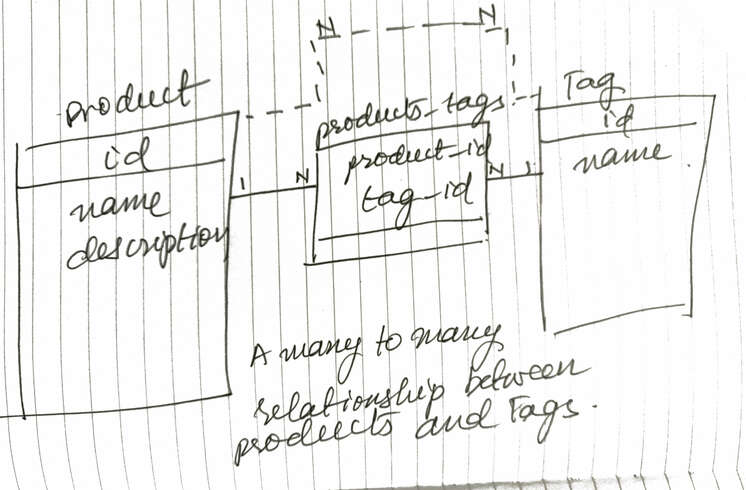
As you can see, we have a many-to-many relation between the products and tags
tables via a products_tags table which has just 2 columns the product_id and
the tag_id and it has a composite primary key (while also having an index on
the tag_id to make lookups faster). The use of a join table is required,
however, you usually want the join table to be invisible in your domain, as you
don’t want to deal with a ProductTag model, it doesn’t serve any purpose other
than helping you bridge the object model with the relational model. Anyway, here
is how we ended up building the many-to-many relationship in Phoenix and Ecto.
Scaffolding the models
We use a nondescript Core context for our Product model by running the
following scaffold code:
1 | mix phx.gen.html Core Product products name:string description:text |
This generates the following migration (I’ve omitted the boilerplate to make reading the relevant code easier):
1 | create table(:products) do |
Don’t forget to add the following to your router.ex
1 | resources "/products", ProductController |
Then, we add the Tag in the same context by running the following scaffold
generator:
1 | mix phx.gen.html Core Tag tags name:string:unique |
This generates the following migration, note the unique index on name, as we
don’t want tags with duplicate names, you might have separate tags per user in
which case you would have a unique index on [:user_id, :name].
1 | create table(:tags) do |
Finally, we generate the migration for the join table products_tags(by
convention it uses the pluralized names of both entities joined by an underscore
so products and tags joined by an _ gives us the name products_tags).
1 | mix phx.gen.schema Core.ProductTag products_tags product_id:references:products tag_id:references:tags |
This scaffolded migration requires a few tweaks to make it look like the following:
1 | create table(:products_tags, primary_key: false) do |
Note the following:
- We added a
primary_key: falsedeclaration to thetable()function call to avoid creating a wastedidcolumn. - We got rid of the
timestamps()declaration as we don’t want to trackinsertsandupdateson the joins. You might want to track inserts if you want to know when a product was tagged with a specific tag which makes things a little more complex, so, we’ll avoid it for now. - We added a
, primary_key: trueto the:product_idand:tag_idlines to make[:product_id, :tag_id]a composite primary key
Now our database is set up nicely for our many-to-many relationship. Here is how our tables look in the database:
1 | product_tags_demo_dev=# \d products |
Getting tags to work!
Now comes the fun part, modifying our controllers and contexts to get our tags working!
The first thing we need to do is add a many_to_many relationship on the Product schema like so:
1 | schema "products" do |
(Note, that we don’t need to add this relationship on the other side, i.e., Tag
to get this working)
Now, we need to modify our Product form to show an input mechanism for tags,
the easy way to do this is to ask the users to provide a comma-separated list of
tags in an input textbox. A nicer way is to use a javascript library like
select2.
For us, a text box with comma-separated tags will suffice.
The easiest way to do this is to add a text field like so:
1
2
3
<%= label f, :tags %>
<%= text_input f, :tags %>
<%= error_tag f, :tags %>
However, as soon as you wire this up you’ll get an error on the /products/new
page like below:
1
protocol Phoenix.HTML.Safe not implemented for #Ecto.Association.NotLoaded<association :tags is not loaded> of type Ecto.Association.NotLoaded (a struct).
to_string function can’t convert an
Ecto.Association.NotLoaded struct into a string, When you have a relation like
a belongs_to or has_one or many_to_many that isn’t loaded on a struct, it
has this default value. This is coming from our controller, we can remedy this
by changing our action to the following:
1 | def new(conn, _params) do |
Notice the tags: [], we are creating a new product with an empty tags
collection so that it renders properly in the form.
Now that we have fixed our form, we can try submitting some tags through this
form, However, when you enter any tags and hit Save it doesn’t do anything
which is not surprising because we haven’t set up the handling of these tags on
the backend yet.
We know that the tags field has comma-separated tags, so we need to do the
following to be able to save a product.
- Split tags on a comma.
- Strip them of whitespace.
- Lowercase them to get them to be homogeneous (If you want your tag names to
be persisted using the input casing and still treat the uppercased version
the same as the lowercased or capitalized versions, you can use
:citext(short for case insensitive text) read more about how to set up:citextcolumns in my blog post about storing username/email in a case insensitive fashion). - Once we have all the tag
nameswe can insert any new tags and then fetch the existing tags, combine them, and useput_assocto put them on the product.
Step #4 creates a race condition in your code which can happen when 2 requests
try to create tags with the same name at the same time. An easy way to work
around this is to treat all the tags as new and do an upsert using
Repo.insert_all with an on_conflict: :nothing option which adds the fragment
ON CONFLICT DO NOTHING to your SQL making your query run successfully even if
there are tags with the same name in the database, it just doesn’t insert new
tags. Also, note that this function inserts all the tags in a single query doing
a bulk insert of all the input tags. Once you upsert all the tags, you can
then find them and use a put_assoc to create an association.
This is what ended up as the final Core.create_product function:
1 | def create_product(attrs \\ %{}) do |
It does the following:
- Normalize our tags
- Ensure that all the tags are in our database using
Repo.insert_allwithon_conflict: :nothingin a single SQL query. - Load all the tag structs using the names.
- Use
put_assocto associate the tags with the newly created product. - From here
Ectotakes over and makes sure that our product has the right association records in theproducts_tagstable
Notice, how through all of our code we haven’t used the products_tags table
except for defining the many_to_many relationship in the Product schema.
This is all you need to insert a product with multiple tags, However, we still want to show the tags of a product on the product details page. We can do this by tweaking our action and the Core module like so:
1 | defmodule Core do |
Here we are preloading the tags with the product and we can use it in the view like below to show all the tags for a product:
1 | Tags: <%= (for tag <- @product.tags, do: tag.name) |> Enum.join(", ") %> |
This takes care of creating and showing a product with tags, However, if we try to edit a product we are greeted with the following error:
1 | protocol Phoenix.HTML.Safe not implemented for #Ecto.Association.NotLoaded<association :tags is not loaded> of type Ecto.Association.NotLoaded (a struct). |
Hmmm, we have seen this before when we rendered a new Product without tags,
However, in this case, our product does have tags but they haven’t been
loaded/preloaded. We can remedy that easily by tweaking our edit action to the
following:
1 | def edit(conn, %{"id" => id}) do |
This gives us a new error:
1 | lists in Phoenix.HTML and templates may only contain integers representing bytes, binaries or other lists, got invalid entry: %ProductTagsDemo.Core.Tag{__meta__: #Ecto.Schema.Metadata<:loaded, "tags">, id: 1, inserted_at: ~N[2020-05-04 05:20:45], name: "phone", updated_at: ~N[2020-05-04 05:20:45]} |
This is because we are using a text_input for a collection of tags and when
phoenix tries to convert the list of tags into a string it fails. This is a good
place to add a custom input function:
1 | defmodule ProductTagsDemoWeb.ProductView do |
With this helper we can tweak our form to:
1
2
3
4<%= label f, :tags %>
<%= tag_input f, :tags %>
<%= error_tag f, :tags %>
<small class="help-text">tags separated by commas</small>text_input has been changed to tag_input.
Now, when we go to edit a product, it should render the form with the tags
separated by commas. However, updating the product by changing tags still
doesn’t work because we haven’t updated our backend code to handle this. To
complete this, we need to tweak the controller and the Core context like so:
1 | defmodule ProductTagsDemoWeb.ProductController do |
Note that in the controller we are using get_product_with_tags! and in the
context, we inserted a line to put_assoc similar to the create_product
function which does the same things as create_product.
Astute readers will observe that our create and update product implementation
doesn’t rollback newly created tags, when create_product or update_product
fails. Let us handle this case and wrap our post!
Ecto provides Ecto.Multi to allow easy database transaction handling. This
just needs changes to our context and our view like so:
1 | defmodule ProductTagsDemo.Core do |
Whew, that was long, but hopefully, this gives you a comprehensive understanding
of how to handle many_to_many relationships in Ecto and Phoenix.
The source code associated with this blog post can be found at https://github.com/minhajuddin/product_tags_demo
P.S. There is a lot of duplication in our final create_product and
update_product functions, try removing the duplication in an elegant way! I’ll
share my take on it in the next post!